RIXBUILD

How it works

How RIXBUILD works — from BoQ to financial overview

RIXBUILD connects the BoQ, schedule, progress claims, variations, documents, e-signatures and finances in one logical process. The team works from one set of data, and management sees the whole project.

RIXBUILD features for construction project control

Projects, documents and collaboration

Core project information, participants, contracts and documents stay in one controlled workspace.

app.rixbuild.lv/projekti
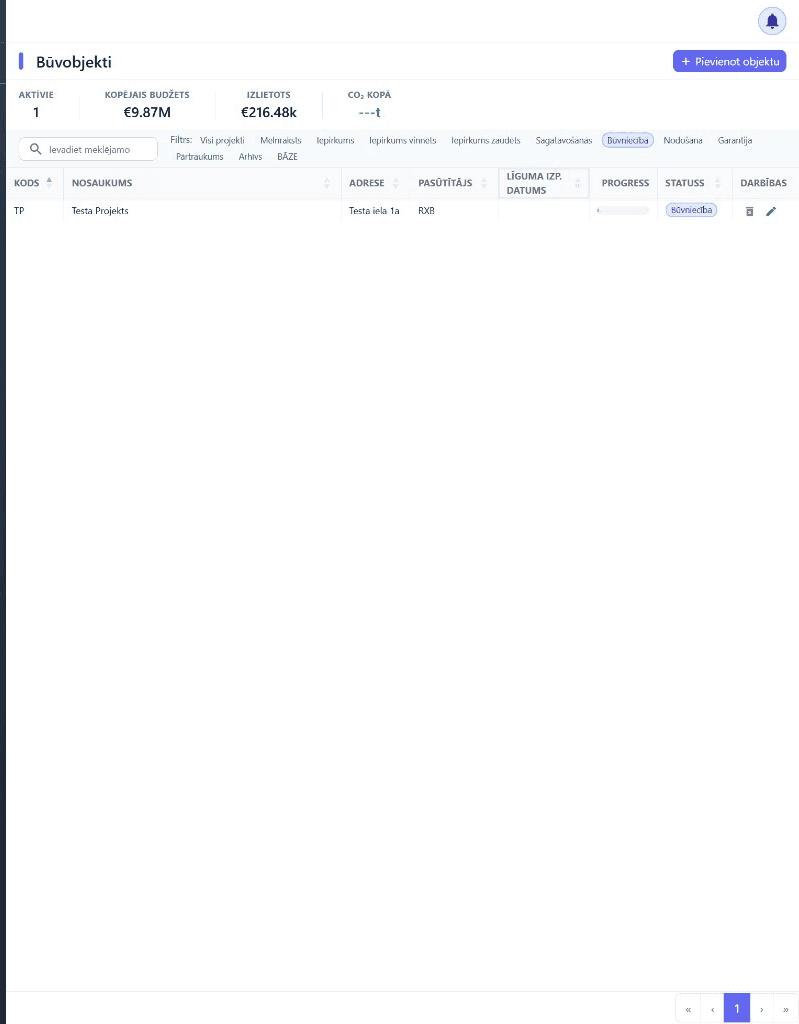
RIXBUILD projektu reģistrs ar objektiem, statusiem un atbildīgajām personām
  • Set up a single project card with responsible people, contracts and key informationThe project basics are no longer scattered across folders and systems.
  • Work from one current version of every documentFewer parallel files, wrong attachments and misunderstandings.
  • Route documents through a defined approval sequenceStatus, comments and decision history stay with the document.
  • Manage user roles and access rightsEveryone sees and does only what they need to.
  • See key project and company deadlines in one calendarInvoices, warranties, insurance policies and equipment inspections.

BoQs, progress claims and variations

BoQ data stays linked to progress claims, payment certificates and project variations.

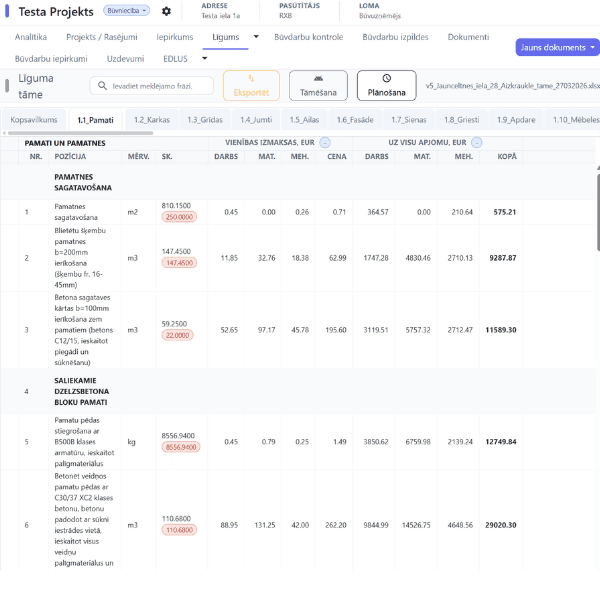
app.rixbuild.lv/tame
RIXBUILD tāmes analīze — līguma tāmes pozīcijas ar vienības un kopējām izmaksām
  • Import existing Excel BoQs without manual retypingLine items are carried over into a structured project view.
  • Find calculation and rounding discrepancies before they affect progress claimsError log, recalculation comparison and PDF report.
  • Generate progress claims and payment certificates from the entered work-done dataNo need to maintain parallel Excel versions with retyped quantities.
  • Compare your own and your subcontractors' work done against one BoQQuantities, previous claims and remaining balances are visible at line-item level.
  • Manage additions and omissions with a clear variation historyComments and locked line items stay with the project data.

Invoices, payments and finances

Invoices, payment preparation and project financial data form one management overview.

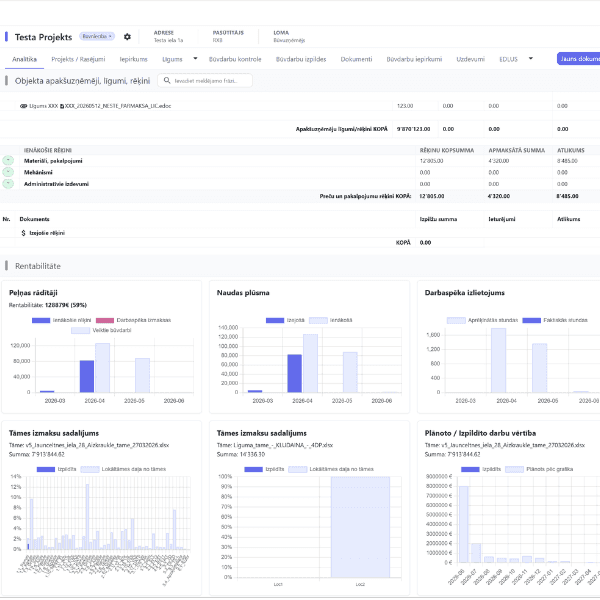
app.rixbuild.lv/finanses
RIXBUILD finanšu analītika ar rentabilitāti un naudas plūsmu
  • Enter invoices individually or in bulkLarge volumes of documents do not have to be processed one invoice at a time.
  • Reduce manual entry with AI invoice data captureThe user checks and confirms the information captured from the document.
  • Route invoices through a defined approval workflowIt is visible where each invoice is and who still needs to approve it.
  • See payment statuses and due dates in one viewManagement sees unpaid and overdue invoices without separate reporting.
  • Prepare a payment file for upload to your online bankRIXBUILD prepares the file but does not execute the bank payment.
  • Compare contracts, work done, invoices, balances and profitabilityManagement sees the project's financial picture, not just individual documents.

Subcontractors, working time and resources

Subcontractor commitments, work done, working time and site resources are transparent in one system.

  • Manage subcontractor contracts, amounts and commitments in one placeContract information stays linked to the specific project and partner.
  • Receive subcontractor progress claims directly against the project BoQ line itemsReceived claims do not have to be retyped into your own reports.
  • Record working time by employee, site and periodWorking time and costs are attributable to a specific site.
  • Manage electronic site attendance (EDLUS) and access recordsWorking time and access data are collected in one system.
  • Use card readers, turnstiles, NFC or geofencingChoose the attendance method that suits the site and how work is organised.
  • Track equipment, inspections and resource-related deadlinesKey equipment data and events do not end up in separate spreadsheets.

Tasks, quality, schedule and budget planning

Tasks, quality control, the project schedule and the planned budget stay linked to the specific project.

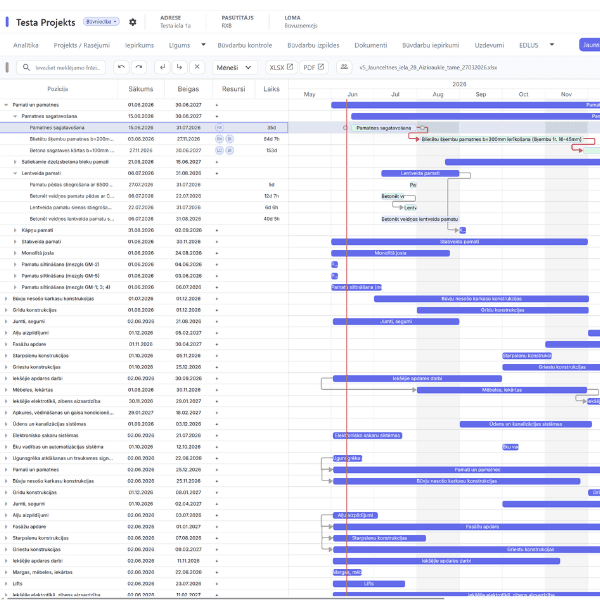
app.rixbuild.lv/grafiks
RIXBUILD Ganta grafiks ar darbu termiņiem un progresu
  • Assign a task to a specific person with a deadline and priorityEvery piece of work has a clear owner and due date.
  • Attach photos, files and comments to the specific taskAll task information stays in one place.
  • Record defects on site and follow them through to resolutionA defect does not get lost in correspondence and stays visible until it is resolved.
  • See task status and delays without a separate reportManagement can check progress by status, deadline and owner.
  • Keep an auditable history of actions and decisionsIt is visible what was done, commented on and changed.
  • Plan project work and budget in a Gantt chartSequence of work, deadlines, owners, progress and planned budget are visible over time.

BIM/IFC, integrations and data

IFC models, element data and system connections complement project information in one workspace.

  • Open an IFC model directly in the browserNo separate heavyweight software is needed to view the model.
  • Inspect model elements and their metadataThe project team can check the element information available in the model.
  • Make BIM information available to the whole project teamThe model is not limited to a few BIM specialists.
  • Use company registry data to fill in partner detailsLess manual entry of legal entity data.
  • Exchange data using the existing import and export formatsData exchange follows the specific supported format and process.
  • Use the data accumulated in the system for analytics and management reportingProject information becomes usable for the big picture, not just individual processes.

Everyone keeps their own data. The project keeps one shared order.

Every project participant can use RIXBUILD independently — for their own projects, documents, finances and team. In a shared project, each party works only with the data and processes they have been given access to.